4.7. 2026 Alex, Resilience, Adaptability Era
4.7.1. Alex Pull Door Traversal
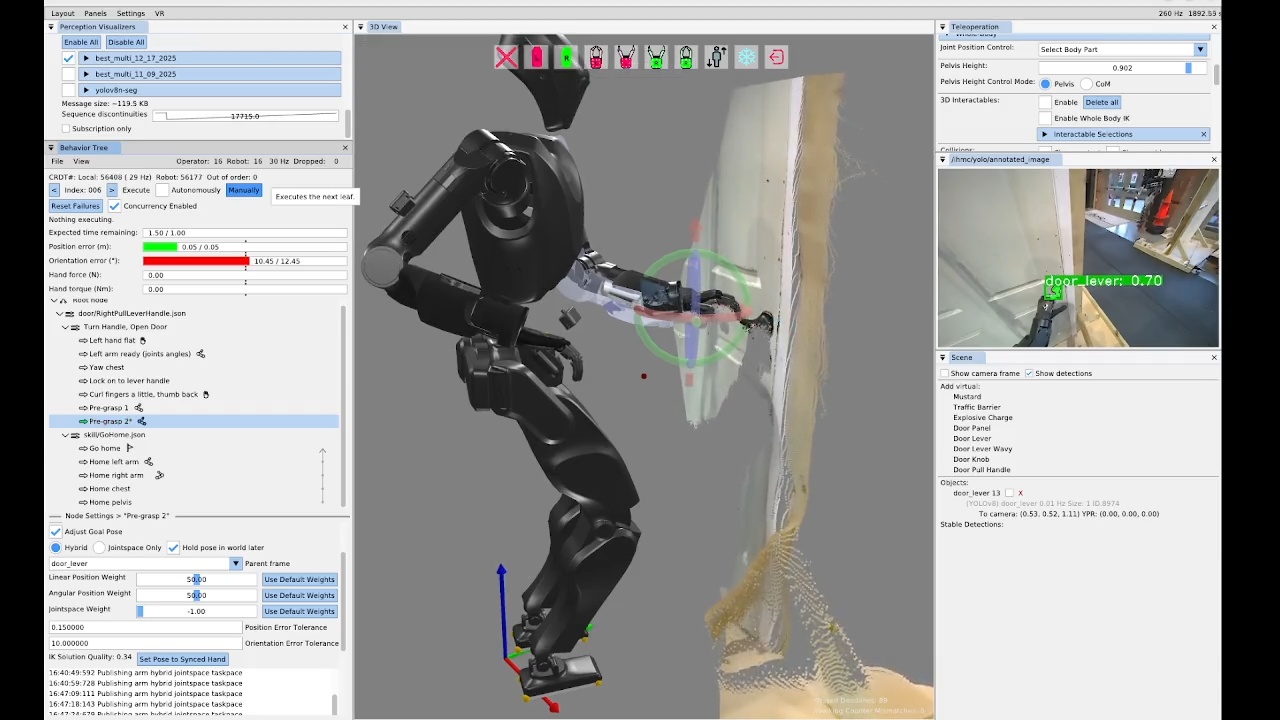
On the same day, in a 33 minute authoring session, we demonstrated a stand-in-place door opening behavior on the new IHMC Alex robot, as seen in Figure 4.61. This was the first autonomous manipulation behavior to run on the Alex platform. The process for getting this to work was essentially the same as the prior door opening behaviors on the Unitree H1-2, with the exception that we needed to point the head down, which wasn’t supported as a behavior action yet. Alex features a neck with pitch and yaw and the default neck pitch does not provide sufficient visibility of the manipulation zone in front of the robot. To perform manipulation, we need to pitch the head down by 30 degrees.
As presented in Table 4.1, the authoring of the first pull door behavior on Alex was a five day process spanning 11 hours and 10 minutes of authoring time.
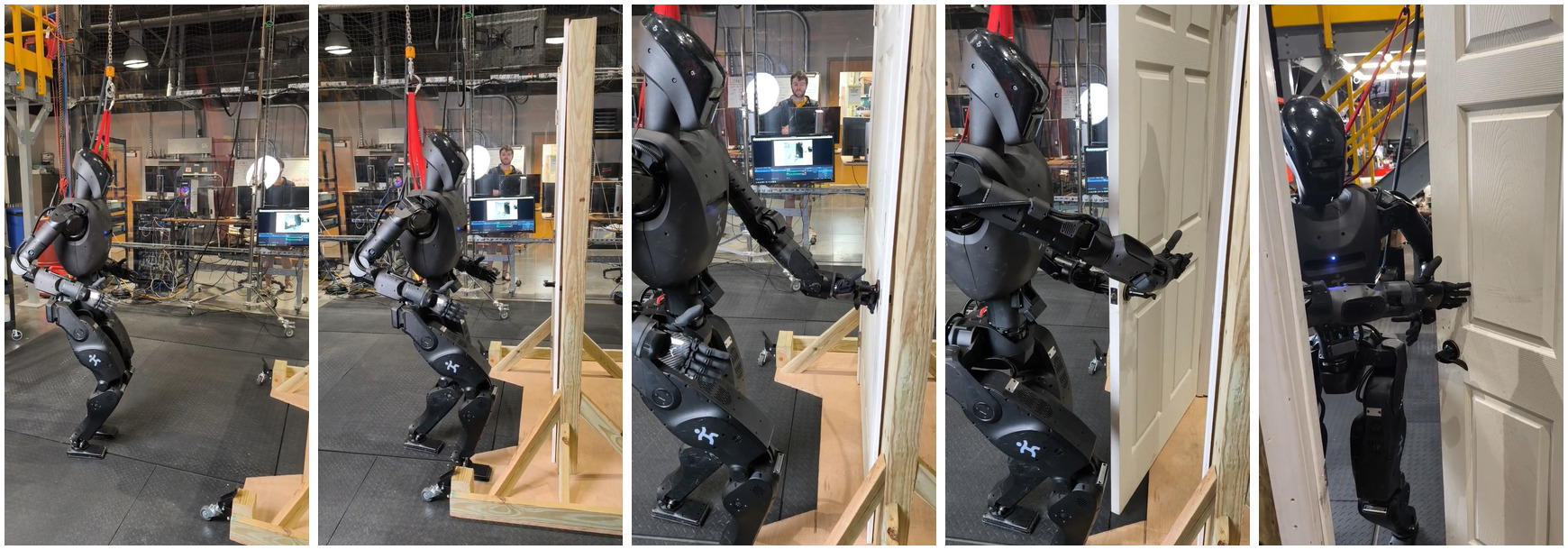
On January 23, 2026, three days after the squared up stance opening behavior, we achieved the approach and opening portion of the pull door behavior, as shown in Figure 4.62. This took a while to get working because Alex’s arms are shorter than Nadia’s were and the spine range of motion was more limited, meaning the same strategy did not work. Nadia’s spine yaw range of motion of +/- 60 degrees was twice that of Alex’s +/- 30 degrees. Also on Nadia, we took a double support stance for opening that was further from the door, using the spine yaw and the longer arms. This allows Nadia’s pull door opening motions to be simpler and faster, due to the robot being farther from the door and having more space to work with. Part of Alex’s pull door behavior involved “sneaking” the left arm in to hold and pull the door open, which was complicated not only by space but also through trying to reduce risk of damage to the Ability Hands. These items contributed to Alex’s door behaviors being significantly slower than Nadia’s. However, we also think that, given some more time, we could speed Alex’s behaviors up significantly.
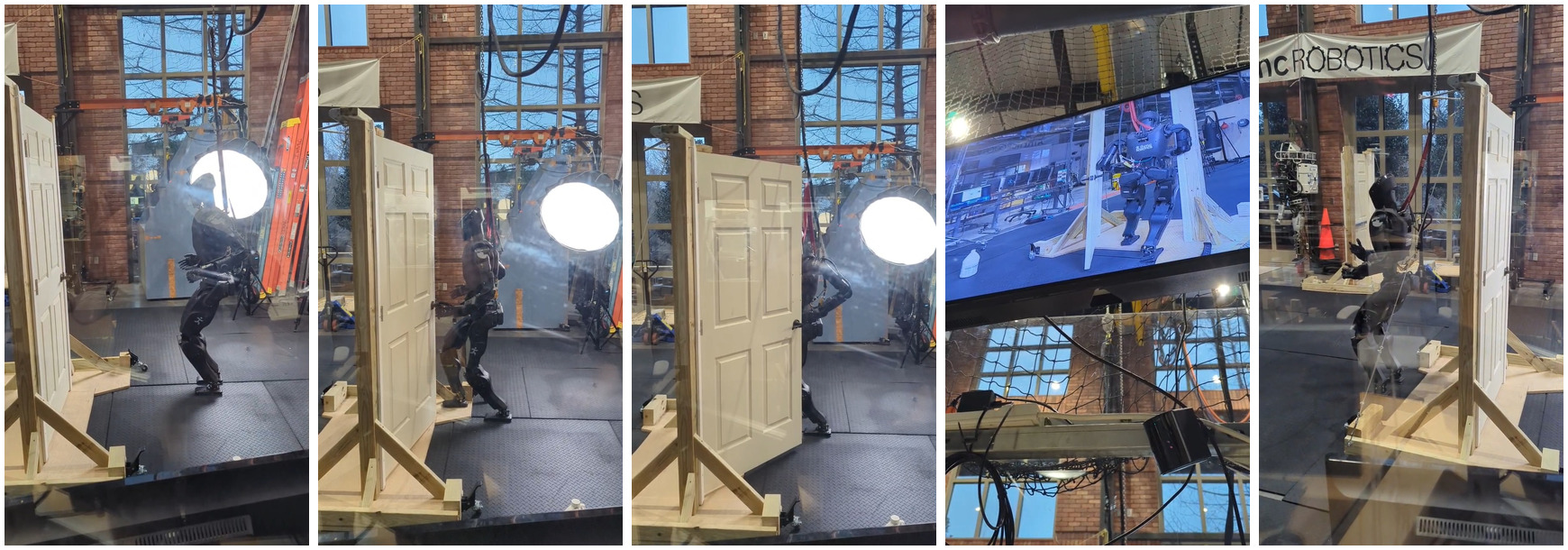
The next day, as shown in Figure 4.63, we authored the sequence for walking through the door and ran the whole behavior. This one was not fully automatic, but it was the first successful door traversal on Alex. Some difficulty was encountered in the preparation steps for the final traversal steps. While taking these preparation steps, Alex had to hold the door open with the left arm, as this door had a spring closer.
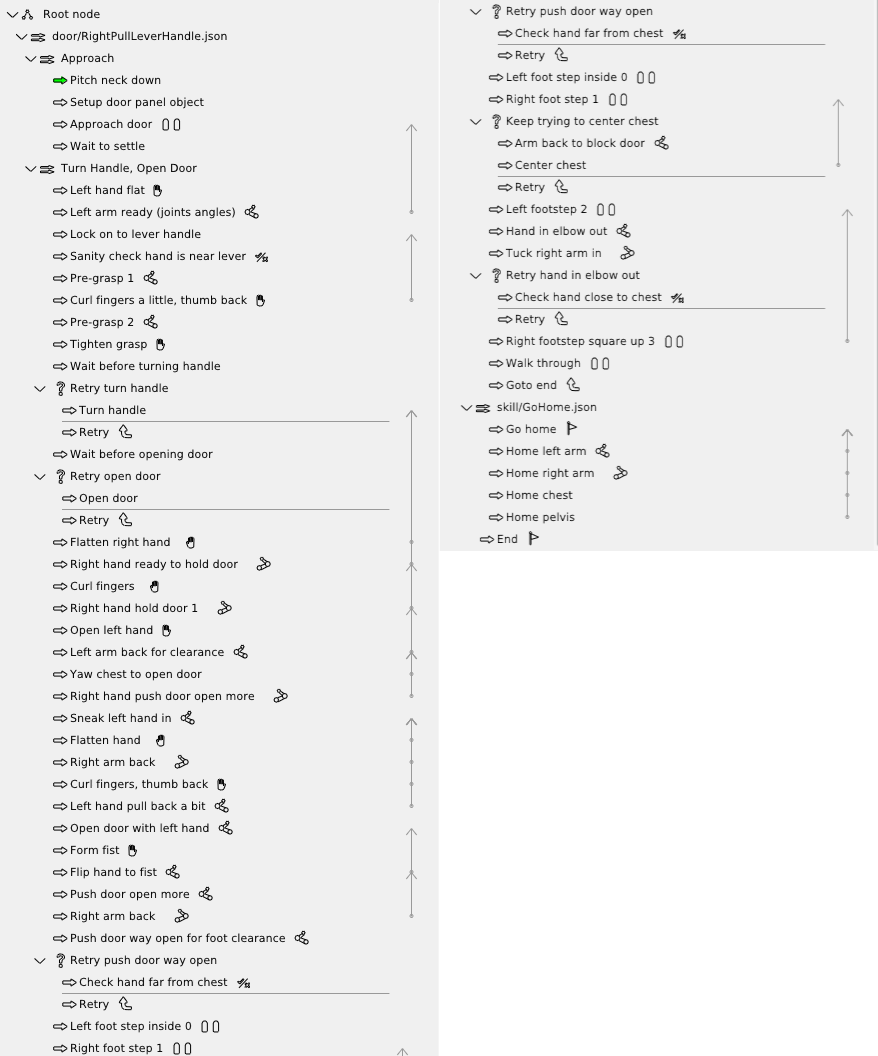
When we first tried, we had falls for at least two reasons. One was that the whole body controller was not well tuned on Alex for walking with the arms out, as was required for holding the door open. Another was that when the robot would take a step toward the door while holding it open, if the holding arm is kept still, when the robot puts its weight on the stance foot, the upper body and arm shifts towards the robot and the foot swing would get caught on the bottom of the door, causing a fall. The solution was to put the arm farther out before or during the traversal preparation steps. This solution can be seen in the tree in Figure 4.64 as the “Push door way open for foot clearance” and “Retry push door way open” nodes.
4.7.2. Shape Contains Condition
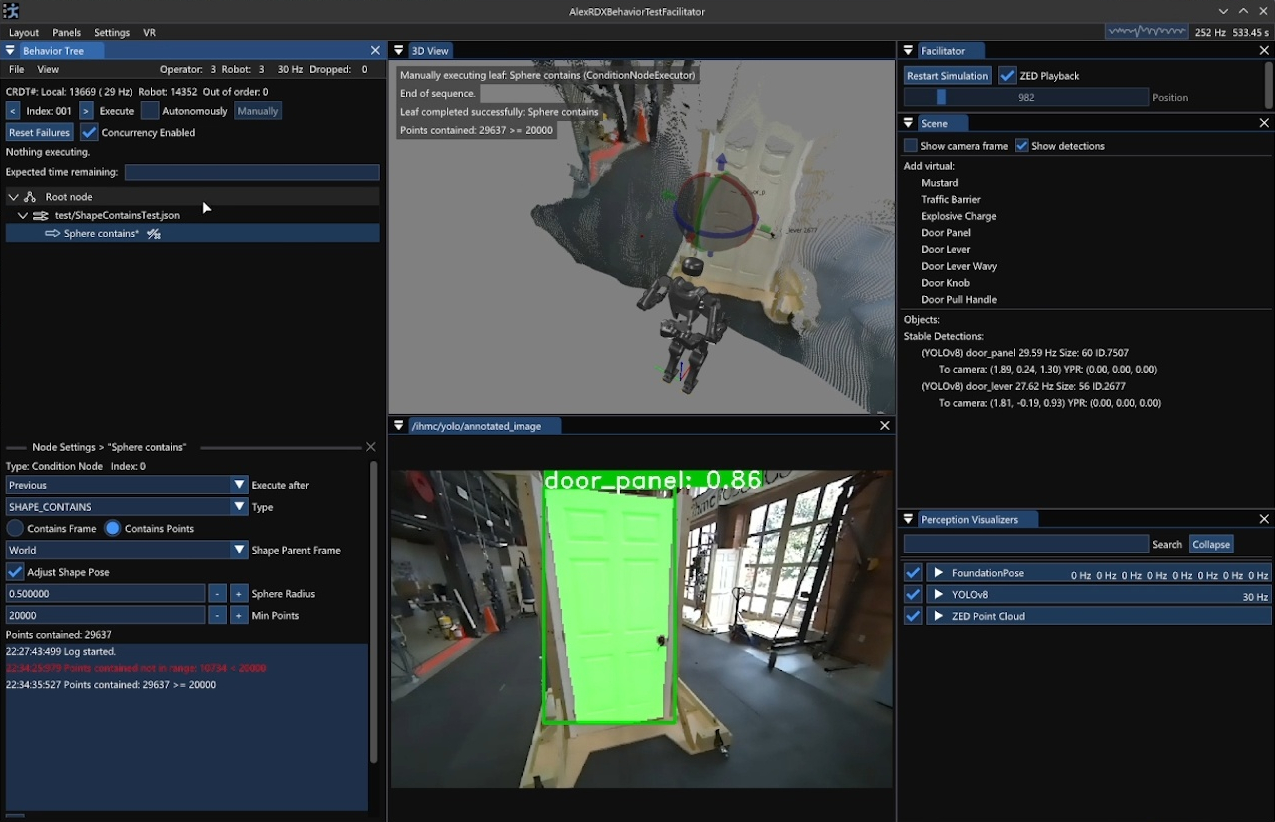
SHAPE_CONTAINS type selected.
The sphere radius, min points, and current number of points contained are displayed.
In the center, the 3D view shows the sphere, intersecting the door, with a red tint that indicates a high number of contained points.
A video is available at https://youtu.be/tbTrKuGGmqk.
The “shape contains” condition was implemented on January 27, 2026 and is shown in Figure 4.65. This new behavior condition returns success if either a reference frame or some minimum number of points from the point cloud lies within a 3D shape. We supported just spheres initially which can be sized and placed with respect to any behavior frame, just like the taskspace actions.
For example, we can use it to check if the whole body controller actually achieved a commanded hand goal pose. Without a fallback node, this condition can be used to stop automatic execution by failing in a sequence. When combined with a fallback node, it can be used in the “try” to branch the sequence of execution. We use it in this way for the door opening retry mechanism, by placing the virtual sphere where the door panel should be with respect to the robot’s chest after opening. If there are no or few points in the sphere at that point, the fallback catch executes a goto node, returning the behavior back to door handle pre-grasp. Else, the behavior skips the fallback catch and continues opening and eventually traversing the door.
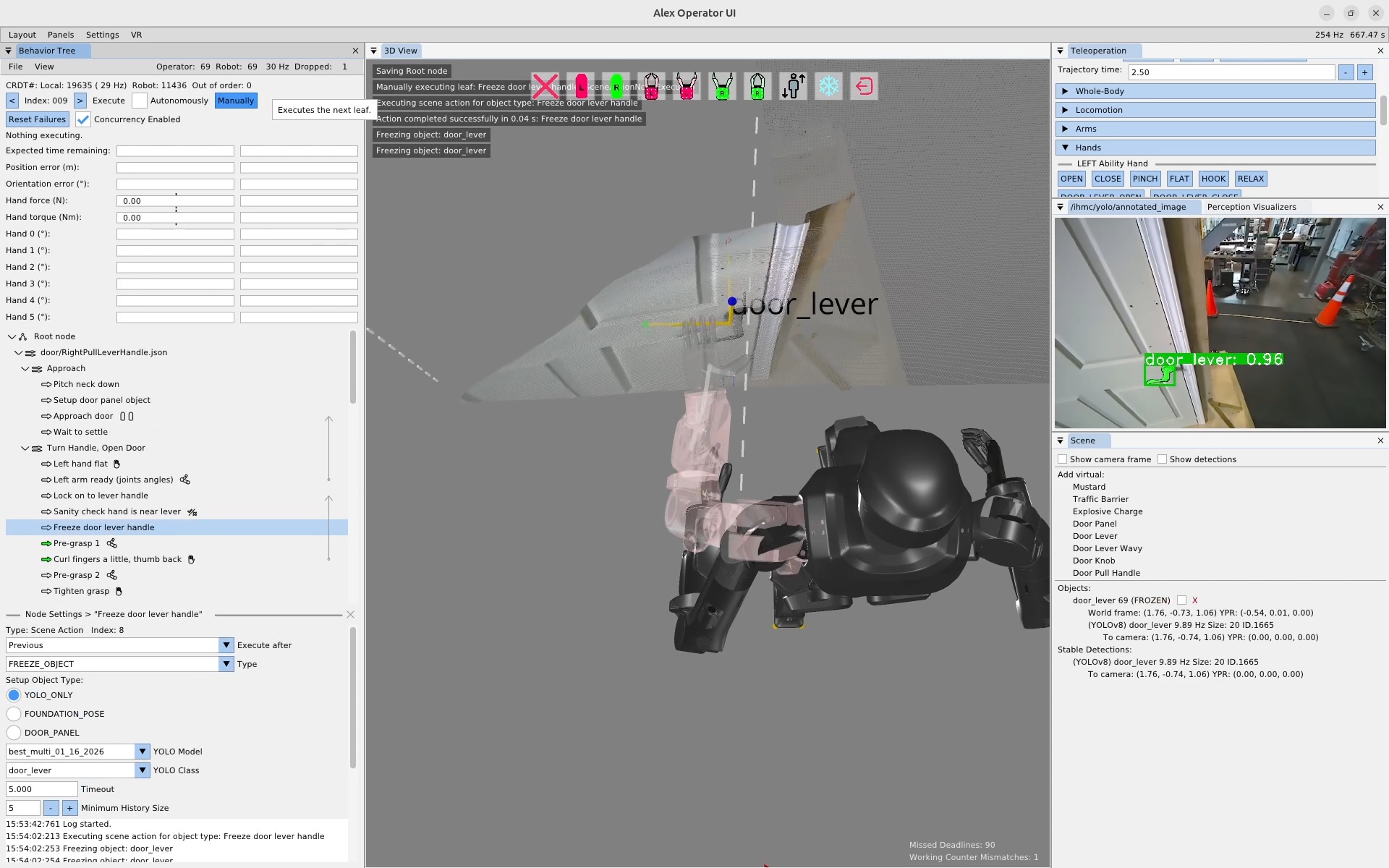
FREEZE_OBJECT scene action type.
On the left, a scene action can be seen in the tree named “Freeze door lever handle”.
In the bottom left, the scene action settings area is shown with the FREEZE_OBJECT type selected.
In the center, the 3D scene has text overlaid reading “Freezing object: door_lever”.
On the right, in the Scene panel, the door_lever object indicates “FROZEN”, meaning its pose will no longer be updated by active tracking.
A video is available at https://youtu.be/dTM4Rw_912Q.
4.7.3. Freeze Scene Action Type
On January 29, 2026, we developed the planned freeze object scene action type, as shown in Figure 4.66. As mentioned previously, the freeze action helps with manipulation by preventing a partial hand occlusion of objects while actively tracking. By freezing the object frame just before occlusion by the hand, we prevent a corrupted object frame during the grasp. Another use case for the freeze action is to dead reckon from the frame of an object we saw in the past, as we do for door handles and the door traversal footsteps.
4.7.4. Fully-Automatic Repeatable Door Traversals
On February 12, 2026, we had our first fully automatic pull door traversal on Alex, that is, there were no gaps in autonomous execution from start to finish. The first run traversed the door in about 45 seconds. In about 10 minutes of speed-focused behavior tuning, we were able to shave that speed down to around 30 seconds. This was done by reducing action trajectory durations, reducing wait times, and increasing the concurrency of robot motions.
As an anecdotal statement on the robustness of our Alex pull door behavior, we ran the pull door behavior from these runs again on February 17, without modification, and it worked the first try. We ran it again on February 18, and it had only one slight arm tolerance issue, which didn’t cause a fall, only a brief gap in autonomy, before completing the traversal successfully. This was a good indication that our behaviors worked independently of slight variations in environmental conditions, such as careful placement of the lab door and the natural lighting coming through the windows, which varies based on time of day.
4.7.5. From-Scratch Push Door Authoring
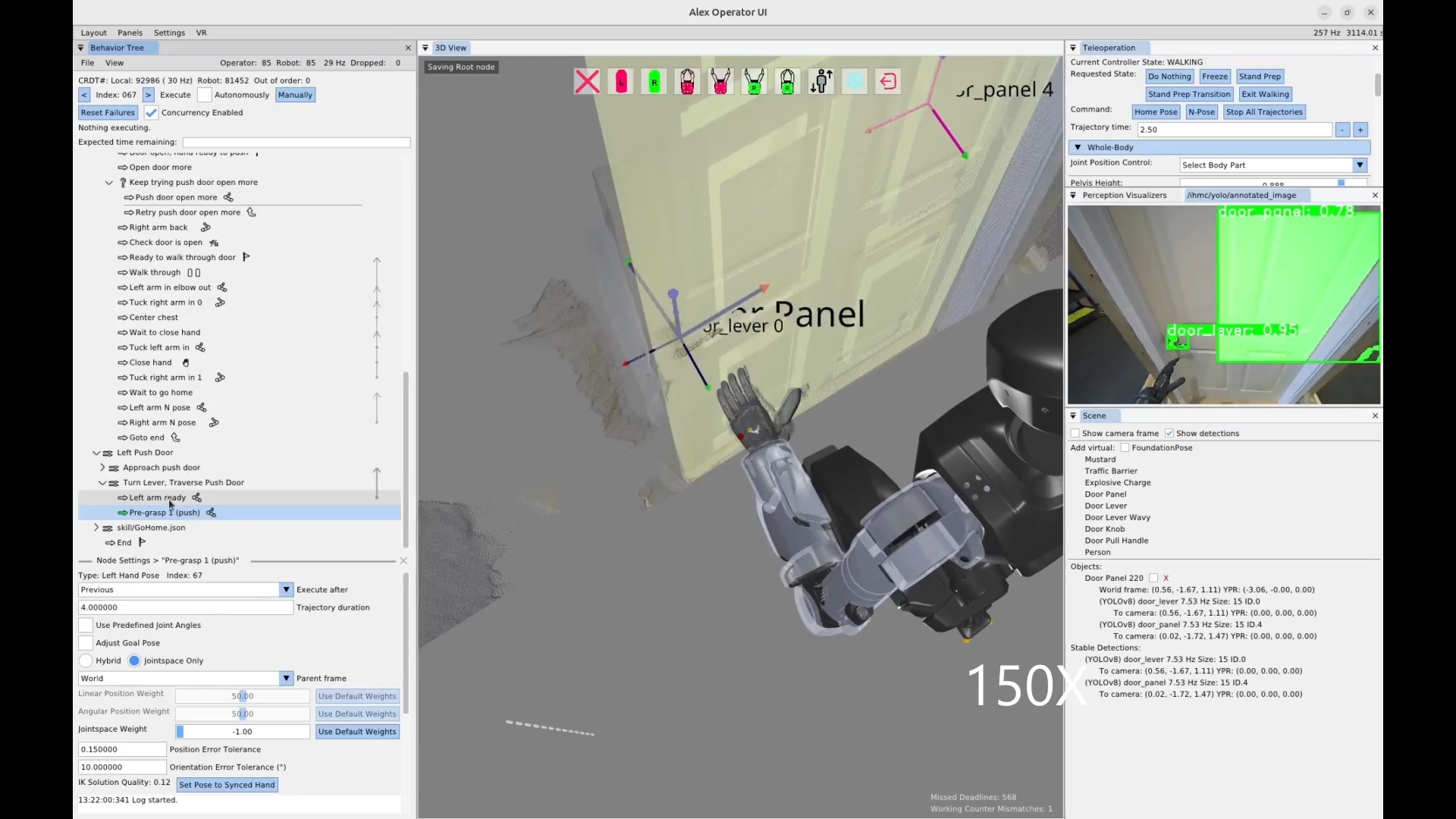
On February 22, 2026, we authored our first push door traversal behavior on Alex in under 2 hours. A screenshot from the session is shown in Figure 4.67 and the timeline of authoring is documented in Table 4.2. The push door traversal executed in 21 seconds.
4.7.6. Quick Footstep Planner
Around this time, we started developing the Quick Footstep Planner to more reliably get footsteps for task approaches on flat ground. This footstep planner uses a procedural geometric heuristic instead of a search algorithm. This helped us by providing an alternative to the existing A* and turn-walk-turn planners. Since the author is able to choose the planning type for each walk action, alternative planning options increase the chance of finding a workable solution.
4.7.7. Node Duplication Options
On February 28, 2026, we introduced a duplication option for all behavior tree nodes. This allows the operator to right-click any node and select “Duplicate” to create a copy. This is useful to speed up authoring, as the author can mutate an existing node if a similar one is needed. Copying and mutating an existing node is often faster than creating a new one from scratch, especially for nearby nodes in a similar context.
4.7.8. New Behavior Node Icons
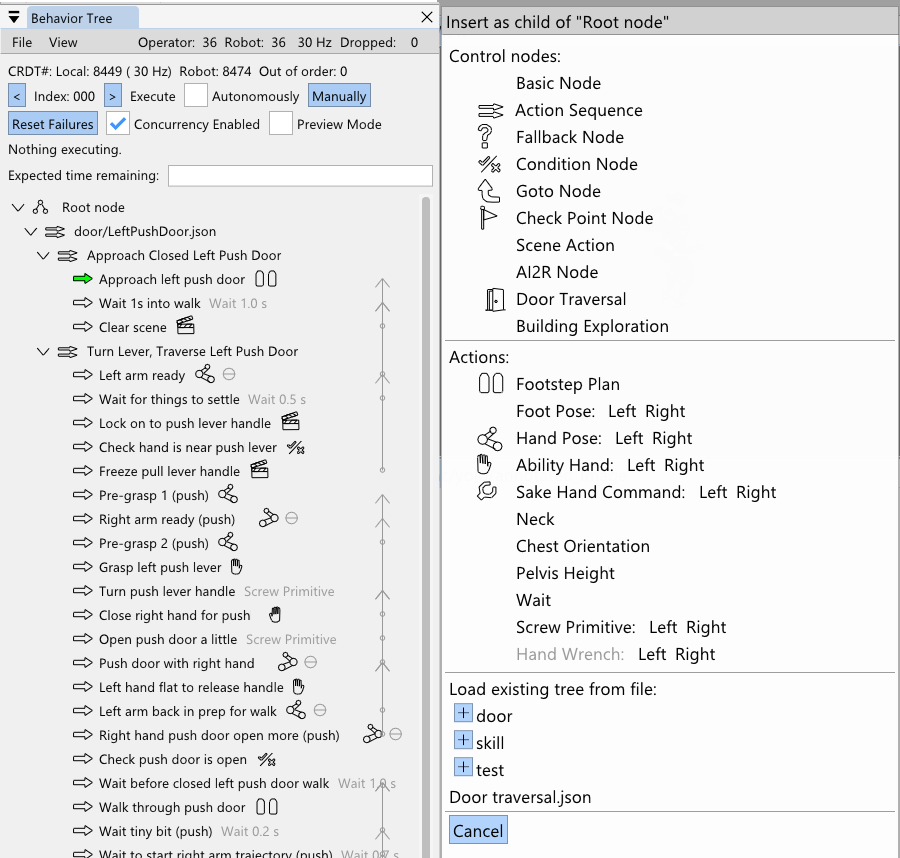
On March 3, 2026, we introduced some new icons, shown in Figure 4.68. At this point in time, the most common actions had an icon. Icons are useful when working with the behavior tree, because they help you locate things much easier and also give at-a-glance verification of node type. This takes the burden off the behavior author to include the action type in the name, which also helps reduce the amount of text in the view.
4.7.9. Node Referencing Improvements
In March, we made a modification that allows the “execute after” field of actions and the “node to goto” field of the goto node to point to non-leaf nodes. This helps avoid needing to create checkpoint nodes just for the purpose of creating a concurrent sequence. It also preps the goto node to eventually become a “gosub”, where it can point to a sequence with the guarantee that control will be returned when that sequence is complete.
4.7.10. Jointspace Indicator
On March 3, 2026, we added a little theta indicator to arm actions when it is defined as joint angles rather than a taskspace pose. This was important because we would often tune the arm configurations using taskspace and forget to switch it back to jointspace. For arm configurations that are frame invariant, such as door frame avoidance or table surface avoidance configurations, the joint angle definition is important. However, after tuning these configurations, if the arm action definition was accidentally left in taskspace in world frame, when executed later, the arm would go crazy trying to reach whatever point in world we were at during authoring. We made the default frame of arm actions chest frame to mitigate this issue, but the visual indicator helps the operator to verify this important action option at a glance. Since jointspace actions are generally safer to execute, it also gives the operator some confidence in executing the action.
4.7.11. Improved Frame Names
On the same day, we cleaned up the default frame names available to behavior actions. They were now more human readable like “Left Hand” instead of “afterGripperZLeft” and “Pelvis” instead of “afterPelvisLink”. This could help new operators climb the learning curve faster and help reduce cognitive burden for expert operators.
4.7.12. Reactive Pull Door Behavior
On March 9, 2026, we conducted a reactivity test of the pull door behavior with Alex. In addition to the fallback node for retrying the door opening, we added one that waits for the doorway to be clear of obstacles before walking through. The test was successful. The robot was disturbed while opening the door three times and retried each time, succeeding on the fourth try. Then, the robot waited for the human to move out of the doorway before starting the walk-through. Unfortunately, the robot fell during the walk-through due to loss of balance, but the reactivity test was a success.
4.7.13. Preview Mode and Nominal Frames
Earlier in March, we implemented a behavior “Preview Mode”, which allows the operator to execute the full behavior against a kinematics simulation robot instead of the real one. On March 12, 2026, we developed a new element to the scene action “setup object” type node called the “nominal frame”. This nominal frame field specifies a pre-defined pose of the object for use in preview mode. At this point in time we do not have a photo-realistic or physics-accurate simulation of the robot, but we wanted to preview the robot’s motions when doing a full loco-manipulation behavior. When the behavior is running in preview mode, setup type scene actions will use a JSON-saved nominal pose to place the object in the scene at that location. This enables the behavior to run through its nominal motions without perception. This feature turned out to also be useful for recording reference motions for training reinforcement learning mimic behaviors.
4.7.14. Collision Avoidance with RRT-Connect
On March 20, we introduced a navigational mode for the Quick Footstep Planner which uses RRT-Connect [85] to avoid YOLO detected obstacles. It plans from the start to the goal but avoids any YOLO objects by maintaining a radius of avoidance. We didn’t end up using it in an actual behavior yet. We think it might be better to use a capsule point check with the point cloud to make it more general. However, RRT-Connect may be too slow when the collision checks have to query the point cloud. It may be a good application of an occupancy map.
4.7.15. Behavior Timeline
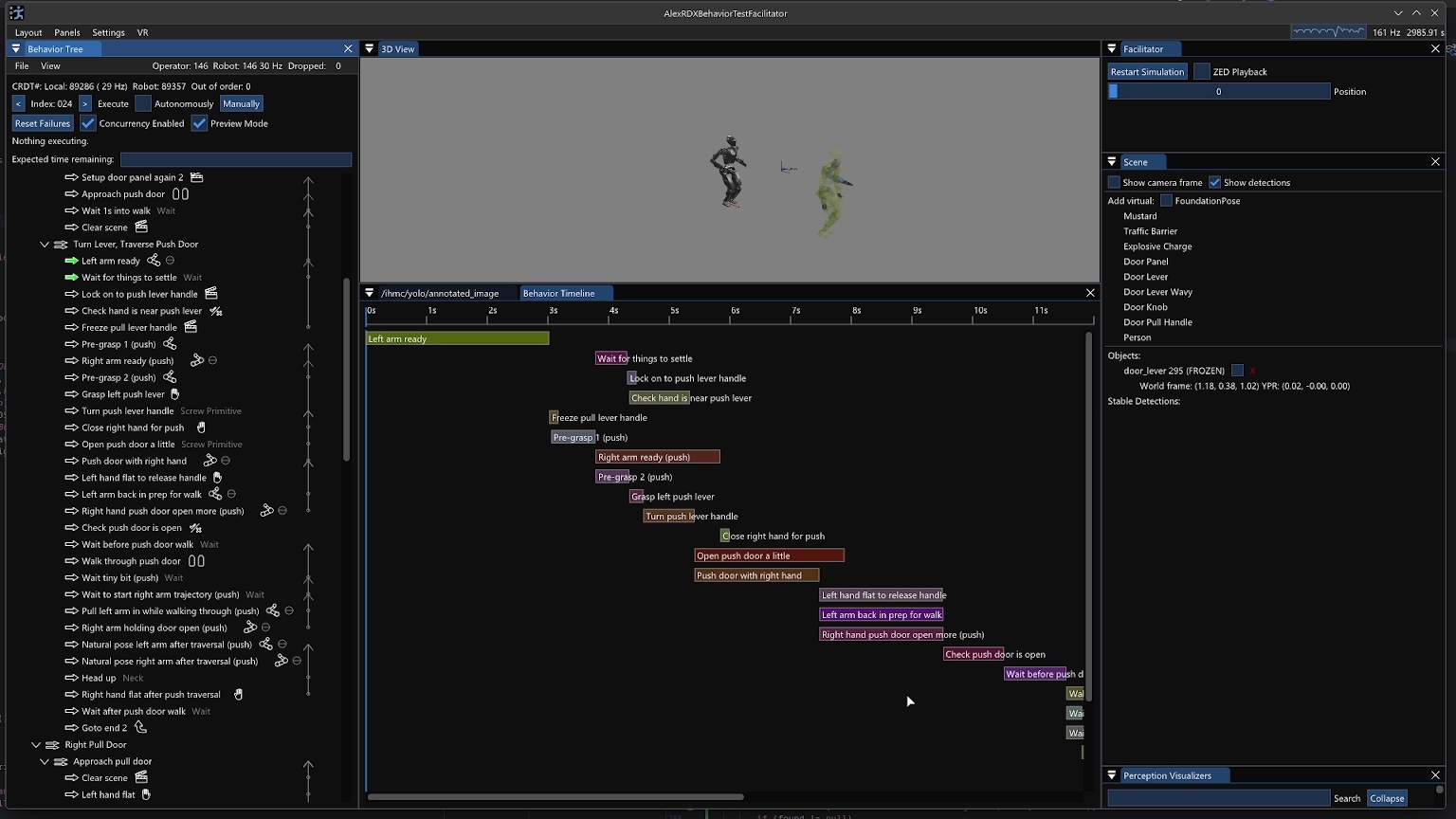
We had talked over the years about how to do a video-editor-like horizontal bars implementation where the behaviors can be viewed by concurrency, start time, and end time. On March 22, we took a stab at an initial behavior timeline implementation as seen in Figure 4.69. One immediate issue with rendering such a view is that action timings are not always known ahead of time. They are often dependent on real-time events, such as the scene node obtaining a stable detection. When the behavior is run in preview mode or regular mode, the actual action durations are stored in the bars, to provide a retrospective on the behavior’s actions over time.
4.7.16. Action and Subtree Mirroring
In trying to build out our general door traversal behavior, we needed mirrored versions of our right pull and left push door behaviors. This became a priority on March 25, 2026 because we were about to attempt our first real-world door traversal – our break room door. Our break room door was a left pull door. Having added the duplicate node feature back in February, we decided to implement a “Mirror” operation as a similarly general feature. Some of our actions were able to be mirrored between left and right invariantly: jointspace arm actions, neck yaw actions, and spine yaw actions.
Other actions required additional information to mirror such as the door-relative approach footsteps. To address our immediate needs, we simply hard-coded a door specific mirror option for five of our action types with a “Mirror (door)” option in addition to the invariant ones. This door-specific mirroring option applies to condition nodes, scene action nodes (for the nominal object poses), arm action nodes, screw primitive action nodes, and walk action nodes.
We also added the option to mirror subtrees, i.e. (“Mirror Subtree” and “Mirror Subtree (door)”), which would try its best to perform the mirroring on the subtree recursively using the functionality we just described on each node or no mirroring if it was not covered. This actually worked really well to create a mirrored version of the pull door behavior which we then took to the break room door to try it for the first time. We were able to preview the mirrored behavior in simulation to verify the general motions before deploying the real-robot.
4.7.17. Traversal of a Real Door
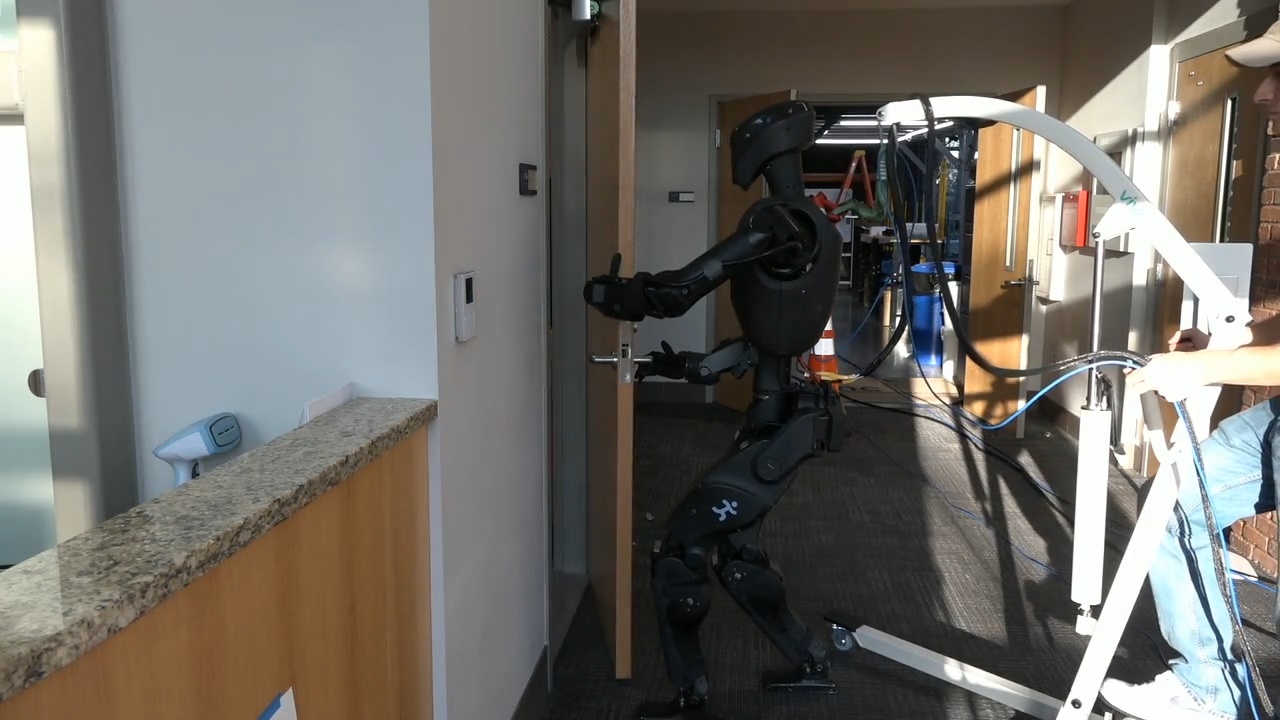
On March 26, we attempted to traverse the break room door, which would be the first time an IHMC robot has traversed a real-world door as opposed to a lab-constructed one. In less than two hours of tweaking the behavior and attempting the behavior, we got a full door traversal to execute successfully in about 33 seconds. A frame from this run is shown in Figure 4.70.
4.7.18. Ball Pick and Place
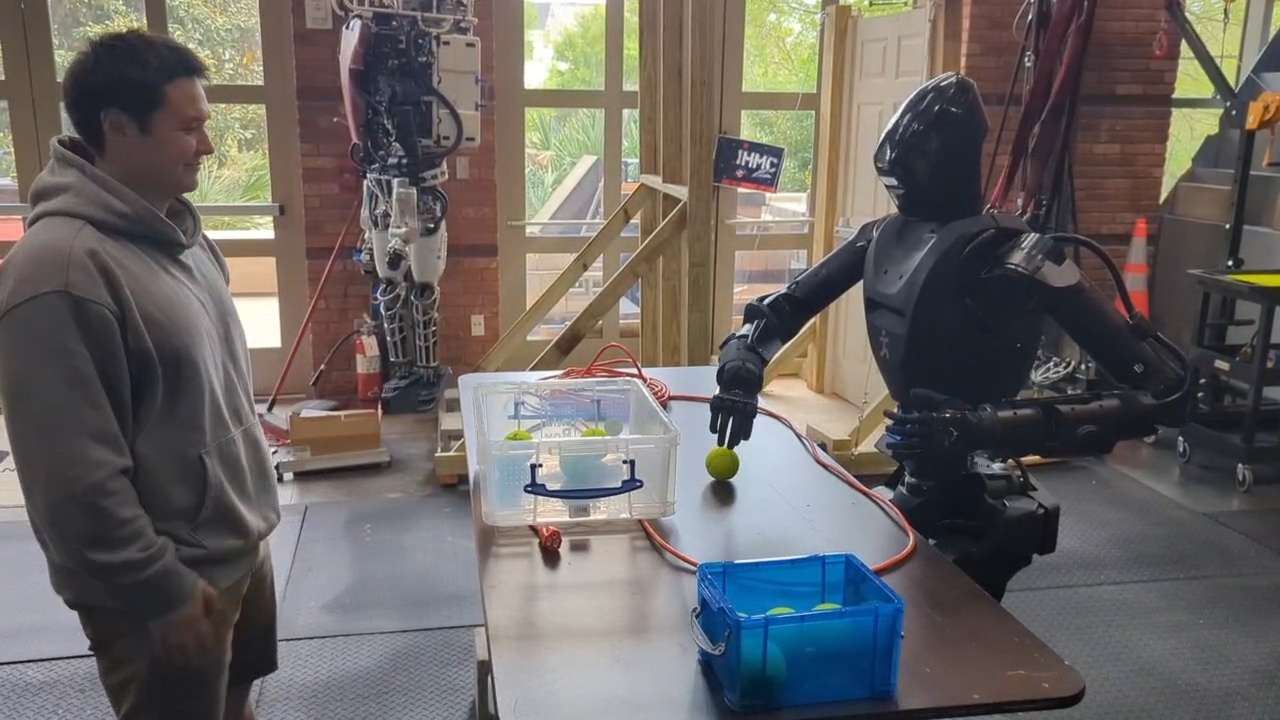
In late March 2026, we decided to focus on demonstrating the versatility of our approach by manipulating objects on tables. Since FoundationPose tracking was not working so well at this time, we picked balls as an object to manipulate since the grasp of a ball does not depend on the ball’s orientation. Since we did not have any orientation-invariant graspable objects in our in-house trained YOLO models, we had to find a generally available model to use. We picked the default “yolov8n-seg” model that comes out of the box with YOLOv8. It has a “sports ball” object class that just barely worked for our use case, detecting our colored tennis balls and baseballs with widely varying confidence levels. Our balls could be detected with high confidence in the 70-80% range, but we could only rely on the confidence levels to be above 2% or so, as they were very often that low.
As seen in Figure 4.71, on March 31, 2026 we had our first ball pick and place behavior running. We used our “sphere contains” condition check to only pick up balls that were in a reachable region on the table, to avoid catastrophic unreachable grasp attempts. This version would often miss the grasps and had some unnatural looking arm configurations and slow trajectories. We also had some issues with the reliability of the YOLO persistent detections. Another problem was that we could not detect the storage containers and the balls at the same time because they were supported by two different YOLO models.
4.7.19. Round-Robin YOLO Model Inference
By April 3 2026, just three days later, we had worked through a lot of these issues and achieved a much more resilient behavior. To start, we corrected unnatural arm configurations and sped up the motions, so the behavior was faster. Secondly, we added the ability to run more than one YOLO model at a time, round-robin style, so we could perceive the balls and the container at the same time. Thirdly, we implemented YOLO model and persistent detection settings management to the scene action node. This meant that the behavior author could decide which YOLO models were running, the enabled object classes within them, and the confidence thresholds for specific object classes for both the YOLO model and the persistent detections. This meant that the behaviors could configure the sports ball class to allow persistent detections of very low confidence, such as the 2% setting we used, to get much higher reliability.
4.7.20. Reactive Colored Ball Sorting
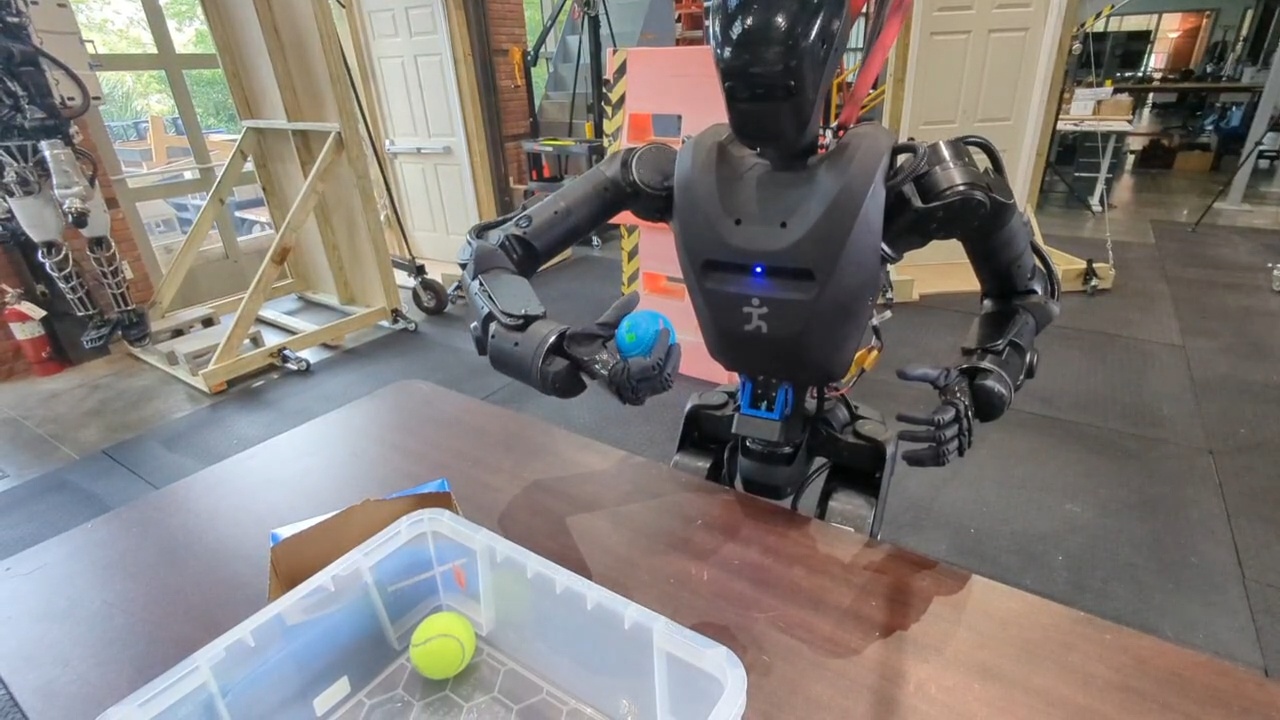
In order to demonstrate online decision-making and reactivity, we then sought to sort the balls by color into separate containers. We also planned, for our annual robotics lab open house where we share our work with the public, to trigger specific behaviors based on ball color. For example, picking up a green ball would cause the robot to go and deliver that green ball to a box on a table beyond a door. On April 4, 2026, as seen in Figure 4.72, we achieved a demonstration in which the robot successfully sorts five balls by color into two different containers, while successfully handling a disturbance where a ball was removed from the table just before the grasp. In this demo, the behavior was authored to pick up the balls and inspect them while still in hand for grasp success and color. If there were no points within the hand, we assumed the grasp failed and returned to pre-grasp. If there were points in the hand, we checked if they were yellow, in which case they would be placed in container A, else they would be placed in container B.
4.7.21. RL Mimic Action
Around this time we were also exploring options to increase the reliability of our door traversal walk-throughs, as the robot would often lose balance during them. Since we had been working with RL mimic policies for boxing and martial arts at the time, we decided to try to incorporate the door walk-throughs as a robustified RL mimic policy trained on the whole-body motion preview available in the behavior system. We trained push and pull door policies and integrated a behavior node called the “Mimic action” which would transition from our model based controller to the mimic controller, perform the mimicked motion, and transition back to the model based controller. We haven’t yet run the mimic policy for the door traversals at the time of writing, but we did train and demonstrate several dance moves as behaviors triggered by picking up different colors of balls, such as an “I love you!” dance, a “Dab” dance, and stretching dance.
4.7.22. Hybrid and Composite Frames
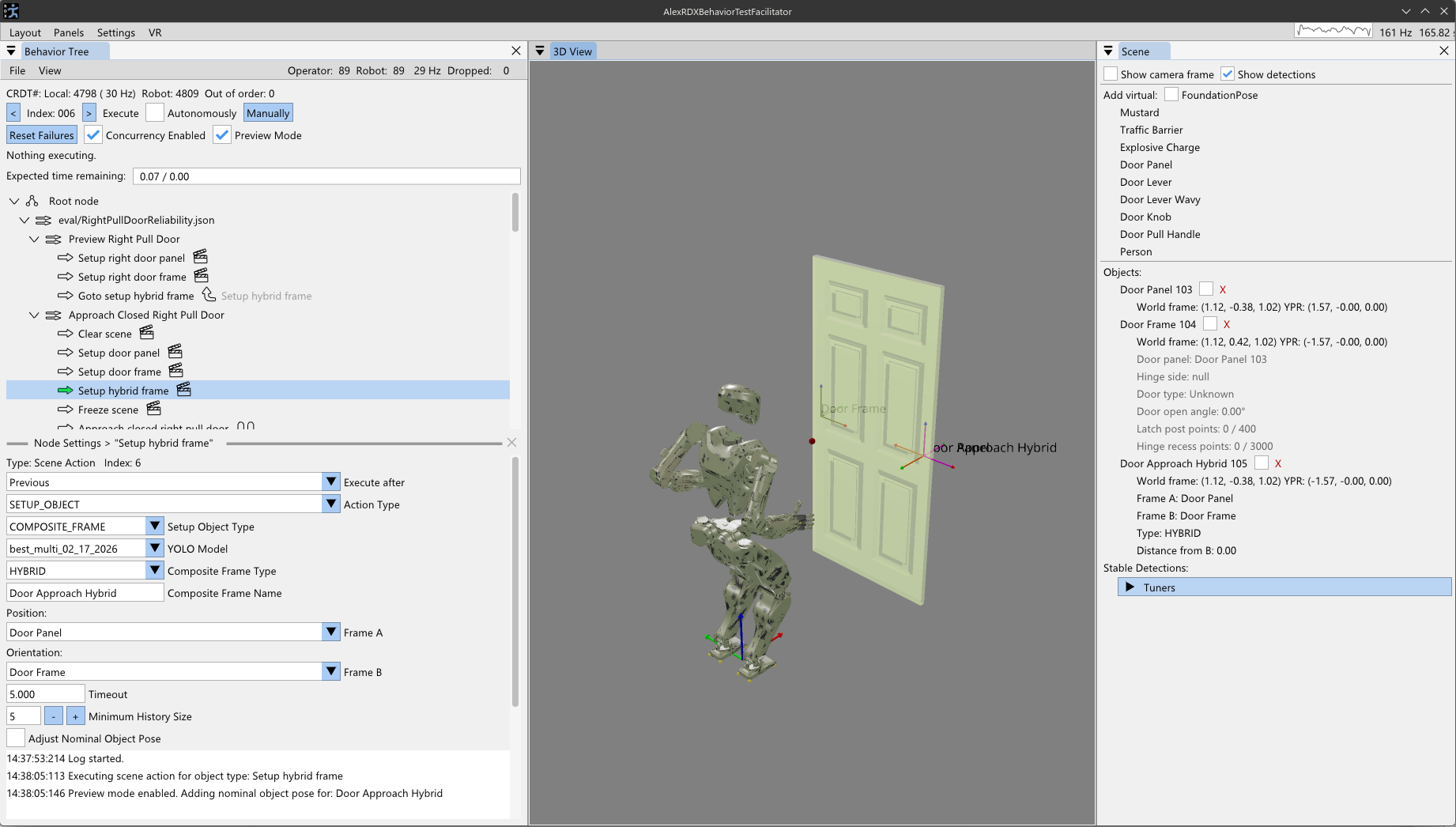
Around this time we ran into a theoretical limitation with approaching tasks from a distance. Given that perceptual capability degrades with distance to a task and we first just need to navigate and approach it, we need a reference frame to define the approach in. Since the pose estimation of the object has the object’s orientation, it does not work as a frame to specify the approach in. Nominally, we would want the robot to approach the task by taking the shortest path from the robot’s current location to the task. Since we don’t want to run into the task, we need to “back off” the approach stance from the object toward the robot. To do this, on April 4, 2026, we decided to add a type of behavior scene object called a composite frame. This composite frame would exist as a privileged object in the behavior scene such that it would be usable in the same way to define actions.
There are currently two types of composite frames: an approach frame and a hybrid frame. They are both generalized to be named frames as a derivative computation of two pre-existing behavior frames. In Figure 4.73, this feature is shown. The approach frame’s orientation is defined to face from frame A to frame B and its position is defined to be on the line segment from frame B to frame A at some tunable distance from frame B. This makes the approach frame suitable for walking directly towards an object, but stopping before getting too close.
The hybrid frame is similar. It takes the position of frame A and the orientation of frame B. The hybrid frame is useful for approaching ajar door panels, where you want to approach with the orientation of the door frame but the position of the door opening mechanism.
Composite frames also can be layered. For example, the ajar door hybrid frame could be used in a subsequent approach frame to approach an ajar door’s handle from a distance. This composite frame mechanism is designed to be extended and generalized further based on encountered real world applications.
4.7.23. Crucial Scene Bugfix
On April 7, 2026, we fixed a pretty major race condition bug between the scene actions and the behavior scene. We had been having to put wait durations after scene actions because the bug would cause the subsequent physical actions to use outdated scene object frames when run in automatic mode. We fixed this through safer and more thorough scene management and synchronization. The behavior tree and scene are managed on the same thread, but it took multiple update ticks for the scene object’s pose to reflect the updated persistent detection’s pose. We mention this bug fix because it marks a leap in trust of the system, prevents user frustration, and avoids robot damage from actions reaching to stale, unreachable object poses.
4.7.24. Approaching Tables with Active Perception
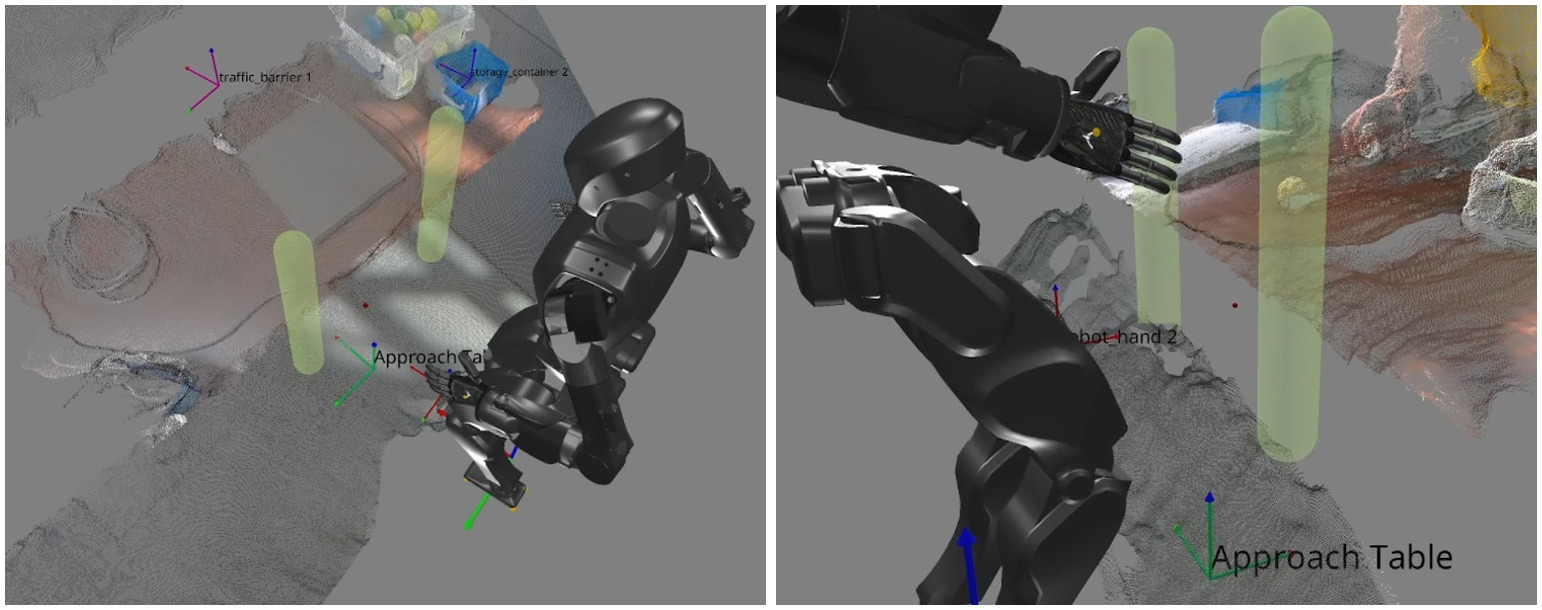
In the same week we developed a novel algorithm for humanoid robot table approach. Using our point-in-shape counting CUDA kernel, we designed a special heuristic scene object called the “Approach Table” object. This was similar in spirit to the heuristic door panel object discussed previously, but differs in that it does not use any semantic detections. Instead, we sweep two vertical capsules forward from the robot’s hips with the intention of colliding with the table’s edge, as shown in Figure 4.74. A tunable threshold for the number of points to be considered constituting the table edge is defined in the settings of this type of scene node. Typically a value of 300-400 points seemed to be good. The capsules start around knee height and end just below chest height with the intention of handling tables of various heights. When a capsule collides with the table, it stops the forward sweep. The two capsules sweep independently. The result is that a line segment in the X-Y plane is now identified as the table edge. This line segment and the current stance height are used to form a reference frame on the ground with the orientation of the table edge. This reference frame can then be used by a subsequent walk action to perform a squared-up approach to the table edge.
Anecdotally, we found this technique to be very reliable and able to approach our tables within a few centimeters of accuracy. This was also an important capability milestone for our behavior system. The ability to approach tables with this degree of accuracy is a necessary part of obtaining the reachability of the items on the table and avoiding failures caused by running into the table.
4.7.25. High-Volume Pick and Place Demo
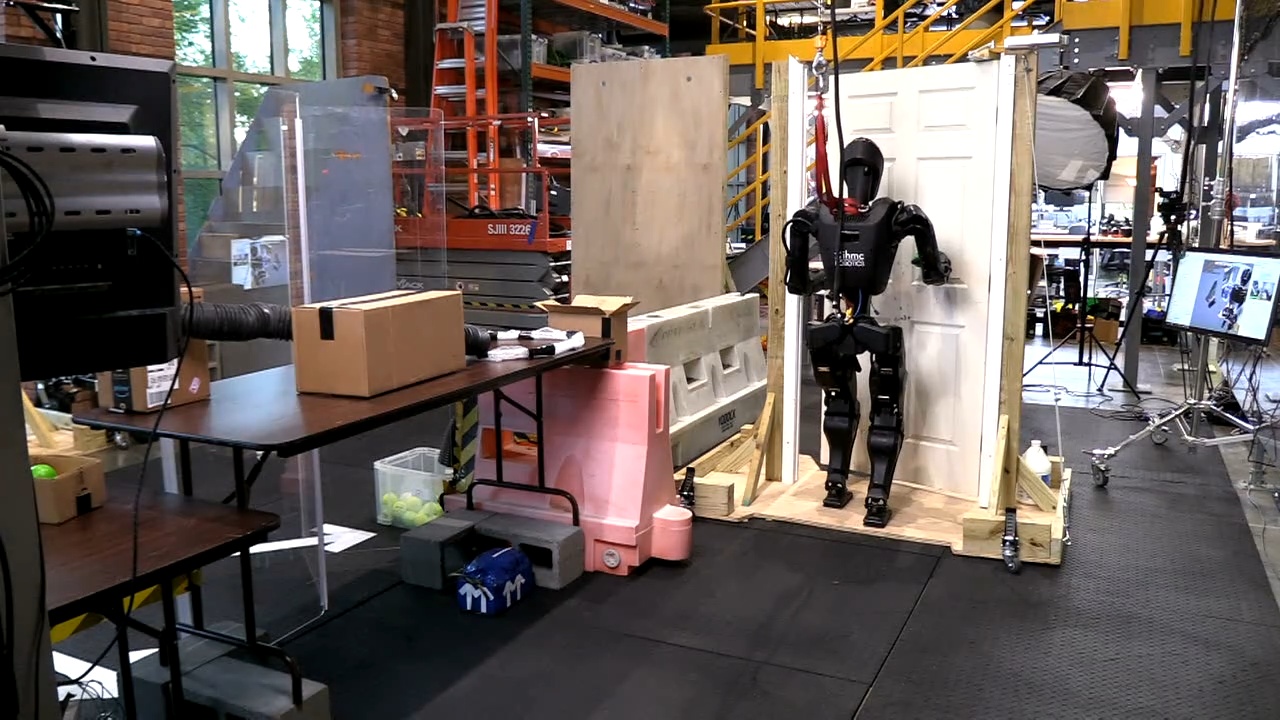
On April 9 and 10, 2026, we designed and rehearsed a demo for our open house where the robot would have a table station where balls of different colors would be fed to the robot through a tube system. The robot would be tasked with picking up the balls, determining their color, and executing a specific behavior for each color, in an infinite loop. Yellow balls would simply be placed in a chute to deliver the ball back to the visitor’s side. Green balls would trigger a delivery behavior where the robot would traverse a door and deliver the green ball to a box on a table beyond that door, as presented in Figure 4.75. The rest of the colors would trigger different RL mimic dances. For example, red balls would trigger the “I love you!” RL mimic dance.
We did some partially successful rehearsals of this demo, but on April 10, 2026, just before the demo, the robot’s legs fell off its body in a dramatic fall. We were able to repair the robot, but avoided doing any more walking that day. During the demo, we picked and placed 199 balls at the table station.
4.7.26. Multi-Station Reactive Ball Sorting
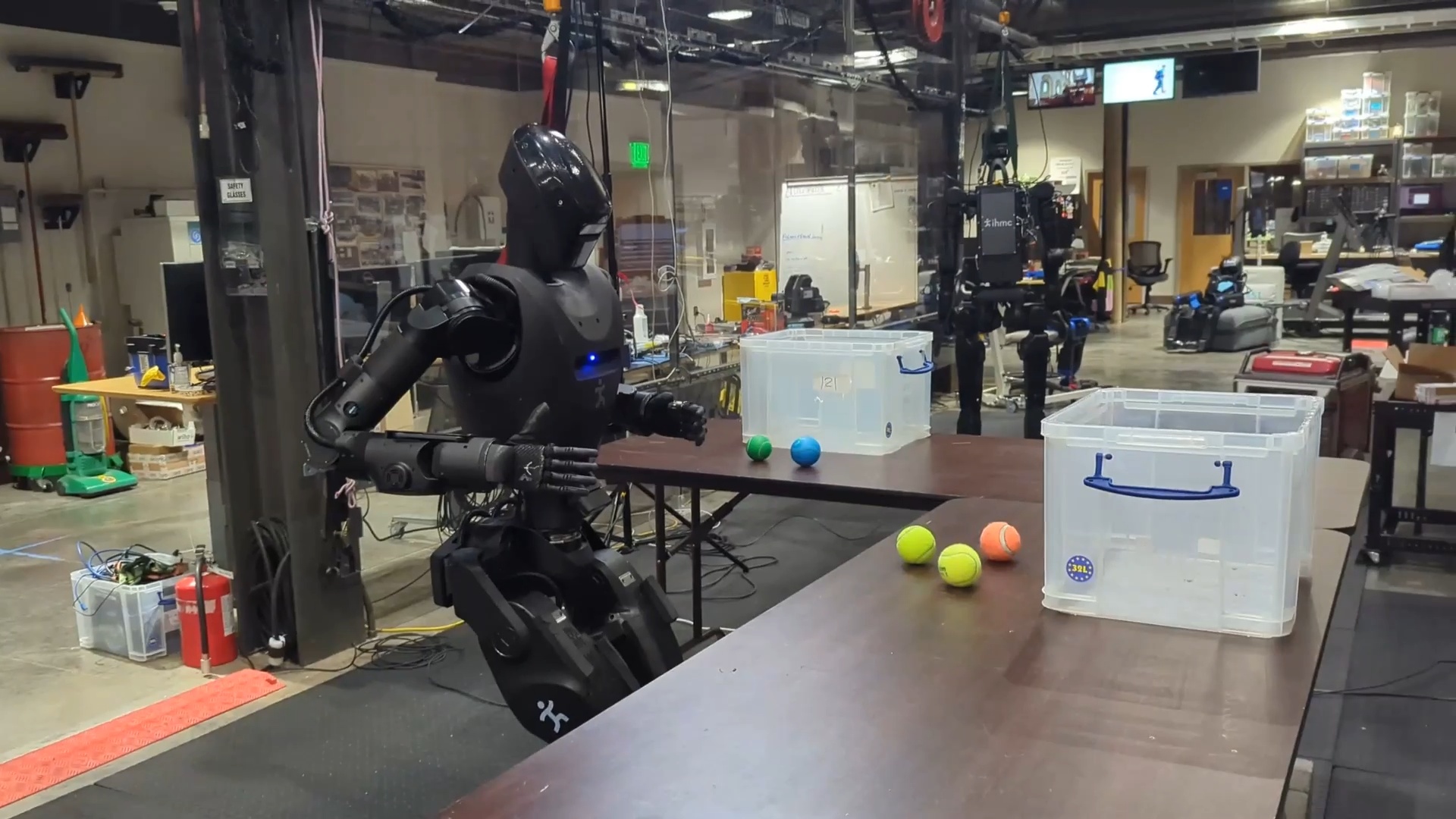
Our last day of testing before the time of writing this thesis yielded some important results. On April 14, 2026, we extended our reactive and robust ball sorting behavior to a multi-station ball sorting behavior. The intention behind this demonstration was to show a compelling loco-manipulation task beyond door traversals. The robot and behavior author were tasked with sorting colored balls between two containers on two different tables, requiring walking between the tables. A still frame from this behavior is shown in Figure 4.76. In a 1 hour and 50 minute time period we were able to extend the stationary sorting behavior to multi-station sorting. In the final demonstration run, the robot sorted 9 balls correctly, with three table approaches including two table-to-table transitions. However, the robot did not perceive the containers and there was one pause where the human experimenter had to shift one of the balls to get YOLO to detect it.
4.7.27. Repeated-Run Reliability Tests
On that same night, we conducted two reliability tests for door approach and opening on both push and pull door variants. We were able to achieve 11 push door approach and openings in a row and 12 in a row for the pull door. This final demonstration in our story marked a reliability milestone in loco-manipulation.
References cited on this page
[85] J. J. Kuffner and S. M. LaValle, “RRT-connect: An efficient approach to single-query path planning,” in Proceedings 2000 ICRA. Millennium conference. IEEE international conference on robotics and automation. Symposia proceedings (cat. No. 00CH37065), IEEE, 2000, pp. 995–1001.